
Apple TV is one of the most capable streaming boxes you can buy, but Apple keeps a tight grip on what actually reaches the App Store. That single fact shapes almost everything about IPTV on this platform. Unlike Fire TV or Android TV, you cannot sideload apps, so every IPTV player you use on Apple TV has to be an approved tvOS app. Some of the most talked about players in the IPTV world, including a few that people search for by name every day, simply are not available here, and no amount of searching in the App Store will change that.
This guide walks through every IPTV player that genuinely works on Apple TV in 2026, explains which ones are worth your time, and clears up the confusion around apps that people assume are on Apple TV but are not. If you already have an IPTV subscription with an M3U link or Xtream Codes login and just need the right player, you are in the right place.
What IPTV Actually Means on Apple TV
IPTV, or Internet Protocol Television, delivers live channels and video-on-demand content over a standard internet connection instead of a satellite dish or a cable box. Your IPTV provider gives you either an M3U playlist link or Xtream Codes credentials, and a player app turns that raw data into a proper channel list, program guide, and video player.
The player and the provider are two separate things. The app you install from the App Store never comes with channels built in. It is simply the software that organizes and plays whatever your subscription provides. This distinction matters because a lot of buffering complaints and missing channel problems actually come from the provider’s servers, not the player app itself.
Apple TV suits this kind of streaming well because of its dedicated video decoding hardware, stable tvOS software, and a remote that makes flipping between channels fast once you get used to it. The tradeoff is a smaller pool of available apps compared to Android-based boxes.
Features Worth Checking Before You Install Anything
Not every IPTV player treats your playlist the same way. Before settling on one, look for:
Core requirements: Support for both M3U and Xtream Codes login, since providers use one or the other and sometimes both. A working Electronic Program Guide (EPG) that pulls in show times and descriptions. Catch-up or timeshift support if your provider offers replay of missed programs. Video on demand (VOD) sections for movies and series if your subscription includes them.
Quality of life features: Multiple playlist support if you use more than one provider. Favorites lists and channel categories so a large channel count stays manageable. Subtitle and multi-audio track switching. iCloud or account-based sync so your settings carry over between your Apple TV, iPhone, and iPad.
Nice to have, not essential: Picture in picture. Parental controls with a PIN. HDR and Dolby Vision passthrough on Apple TV 4K. Built-in recording, which very few Apple TV apps actually offer.
The Best IPTV Players for Apple TV, Reviewed
These are the players you can actually download from the tvOS App Store today, based on their real feature sets and how they hold up in daily use.
IPTVX
IPTVX has built a reputation as one of the more polished IPTV clients on Apple TV. It supports Xtream Codes, M3U, M3U8, Plex, and SMB sources, which is a wider range of formats than most competitors offer. Standout features include Picture in Picture, TV Archive for catch-up, automatic EPG detection, and parental controls. There is a free tier for testing before you commit to the paid version.
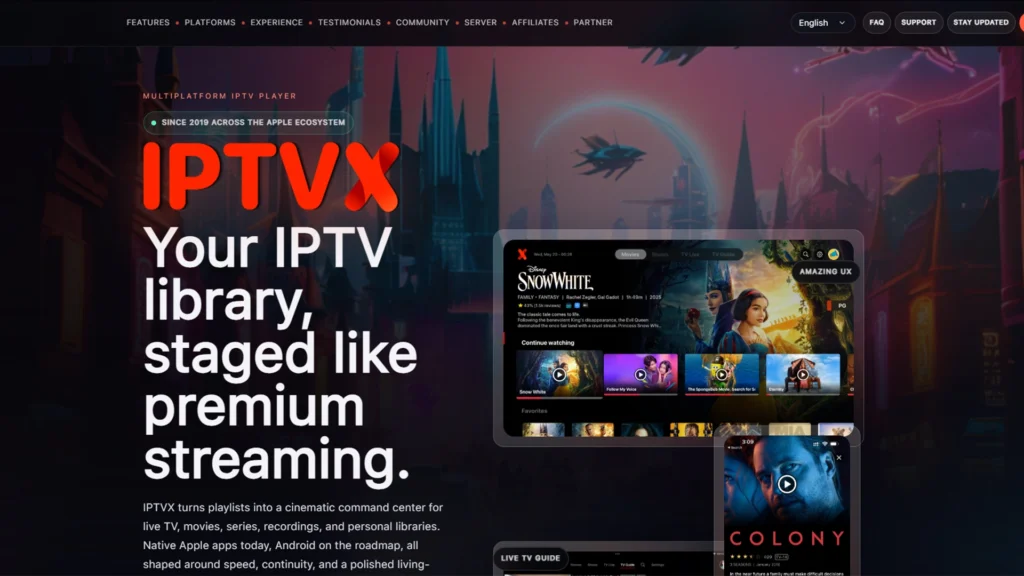
Best for: people who want the most complete, actively maintained app and do not mind paying for the full feature set.
iPlayTV
iPlayTV has a long track record on Apple platforms and a reputation for being lightweight and dependable rather than flashy. It supports M3U playlists, a clean EPG timeline, and works reliably even with large channel lists. Some versions offer a one-time purchase instead of a recurring subscription, which appeals to people who dislike ongoing IPTV app fees. It also supports external players like VLC and IINA for content that its internal player struggles with.
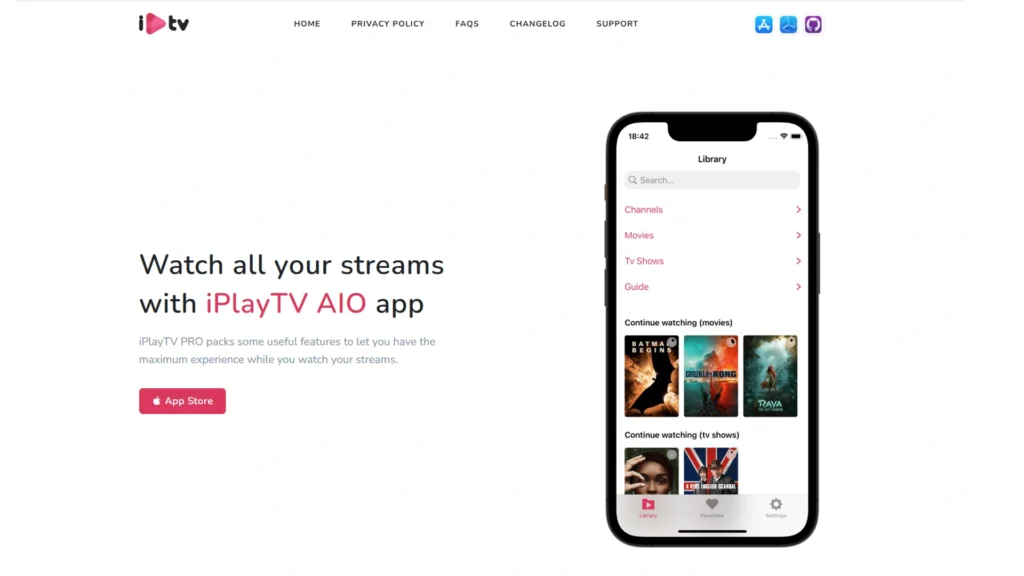
Best for: Newcomers to IPTV who want something that just works without a learning curve.
GSE Smart IPTV
GSE Smart IPTV has been around for years and remains one of the most configurable players on Apple TV. It handles multiple playlist formats, supports external player handoff, and gives you granular control over subtitles and audio tracks. It works across iPhone, iPad, and Apple TV with iCloud sync tying them together. The interface feels less refined than IPTVX or iPlayTV, but the depth of settings makes up for it if you like fine-tuning things.
Best for: Power users who want control over every setting rather than a simplified experience.
Smarters Player Lite
This is the layout most IPTV service providers actually design their setup instructions around, since IPTV Smarters has been a standard reference client for years. On Apple TV, it supports Xtream Codes login, separate sections for live TV, movies, and series, and standard EPG support. Navigation is simple and predictable, which matters if you are setting this up for a family member who just wants to press play.
Best for: Anyone whose provider specifically recommends Smarters style setup, or who wants the most familiar interface.
Flex IPTV
Flex IPTV has quietly been in continuous development since 2016, which is a long lifespan in an app category where many players disappear within a year or two. It supports both M3U and Xtream Codes, includes an XMLTV-based EPG, auto-reconnect for unstable streams, and importantly, built-in live stream recording to local storage. Very few Apple TV IPTV apps offer real recording, and Flex is currently one of the only ones that does it well. It is priced per platform as a one-time purchase rather than a subscription.
Best for: Anyone who specifically wants to record live TV on Apple TV, since most competitors do not offer this at all.
Snappier IPTV
Snappier IPTV is built specifically with Apple hardware in mind and performs best on Apple TV 4K models. It ships with three built-in media players, KSPlayer, VLC, and MPV, and lets you pick whichever handles your provider’s streams best. It supports HDR, multiple simultaneous playlists with one-tap updates, search across every playlist at once, and an optional companion app called Snappier Server for scheduling recordings and downloads. The free version plays with a watermark after a short time, after which a low-cost subscription unlocks full use.
Best for: Apple TV 4K owners who want a modern, actively updated app with real HDR support and flexible player options.
UHF
UHF was built by a team with a long history of iOS development, and it shows in how the app handles the EPG, which was redesigned specifically for touch and remote navigation rather than being a port of an Android layout. It includes Trakt integration for tracking what you watch, a companion DVR server app, and what its developers call smart reconnect technology for flaky connections. Most core features are free, with premium options available as an upgrade.
Best for: People who want an EPG that actually feels native to Apple TV rather than adapted from another platform.
Apps People Search For but Cannot Actually Get on Apple TV
This is where a lot of guides on this topic get things wrong or simply avoid the subject, and it causes real confusion. If you have used IPTV on a Firestick or Android TV box before, some of the names below will sound familiar. Here is the accurate status of each one on Apple TV specifically.
TiviMate
TiviMate is arguably the single most recommended IPTV player among Android TV and Firestick users, known for its EPG grid and channel switching speed. It does not have an official iOS or tvOS version, and its developers have never given a timeline for one. TiviMate is built on Android’s Live Channels framework, which is part of why it has stayed Android-only.
What is confusing is that the App Store does list several apps with very similar names, such as TiviMax, TiviMatu, and TiviMato, made by unrelated developers who are clearly trying to capture searches for the real TiviMate. Some of these are reasonably capable IPTV players in their own right, but they are not TiviMate, do not share its code, and reviews for them are frequently mixed. If your goal is specifically the TiviMate experience, the honest answer is that Apple TV does not have it, and apps like IPTVX or UHF are the closest equivalents rather than substitutes.
Sparkle TV
Sparkle TV, developed by HKAB, is a free IPTV player designed for Android TV, Google TV, and Fire TV, and it is often described as a TiviMate style alternative because of its similar layout and DVR features. It is not available on the Apple App Store and has never had an Apple TV version. There is a separate app also called Sparkle IPTV Player from a different, unrelated developer on the App Store aimed at iPhone and iPad, but it is a different product entirely, and its Apple TV support is unclear at best. If a guide tells you to install “Sparkle TV” on your Apple TV, treat that claim with caution.
Kodi
Kodi has no official tvOS app, and Apple does not allow it in the App Store, a policy that has not changed in years. Getting Kodi onto an Apple TV HD or Apple TV 4K requires sideloading through Xcode on a Mac, which involves creating a developer certificate and re-signing the app every 7 days unless you pay for an Apple Developer account. This is a meaningfully more technical process than installing anything from the App Store, and it is not something most people should attempt purely for IPTV playback when native alternatives exist.
VLC
VLC is officially available on the tvOS App Store and is completely free. It plays network streams, so technically it can open a single M3U8 or direct stream URL. What it is not is a full IPTV client. VLC has no channel list management, no EPG, no favorites, and no way to browse an entire M3U playlist the way IPTVX or GSE Smart IPTV can. It is genuinely useful as a backup player for one-off stream URLs or for playing local media over your network, but it is not a replacement for a dedicated IPTV app if you have more than a handful of channels to manage.
Quick Comparison Table
| App | M3U | Xtream Codes | EPG | Best For |
|---|---|---|---|---|
| IPTVX | Yes | Yes | Strong | Overall polish and features |
| iPlayTV | Yes | Limited | Good | Simplicity and stability |
| GSE Smart IPTV | Yes | Yes | Good | Deep customization |
| Smarters Player Lite | Limited | Yes | Good | Familiar Smarters layout |
| Flex IPTV | Yes | Yes | Good | Recording live TV |
| Snappier IPTV | Yes | Yes | Good | Apple TV 4K, HDR |
| UHF | Yes | Yes | Excellent | Native feeling EPG |
How to Install and Set Up an IPTV Player on Apple TV
The process is nearly identical across every app in the App Store, since Apple requires a consistent installation flow.
First, open the App Store directly on your Apple TV, not on your iPhone, since not every IPTV app is universal across devices. Search for the player you have chosen and select Get to download it. Once it opens, look for an option along the lines of Add Playlist, Add Account, or Xtream Codes Login. Enter the M3U URL your provider sent you, or the Xtream Codes server address, username, and password. If your provider gives you a separate EPG URL, add that in the same setup screen or in settings afterward. Give the profile a name if asked, then wait for the app to load and index your channels.
Typing long URLs and passwords with the Siri Remote is genuinely painful. If your chosen app supports it, use the Apple TV Remote feature inside Control Center on your iPhone, which turns your phone into a full keyboard and makes this step much faster.
M3U and Xtream Codes, Explained Simply
An M3U playlist is a plain text file containing a list of stream links, one per channel. It is the older, simpler standard and works with almost every IPTV player. Xtream Codes is a login-based system where you enter a server address, username, and password instead of a raw link, and the app fetches your channel list, VOD library, and EPG data directly from the provider’s panel. Xtream Codes generally loads faster and organizes VOD content better, while M3U is more universal and easier to troubleshoot manually. Most modern providers offer both, and most modern Apple TV apps support both as well.
Free Versus Paid IPTV Apps on Apple TV
A free IPTV player is usually enough if you watch casually and do not need advanced EPG features, multiple playlists, or recording. Paid tiers typically unlock a cleaner interface without watermarks, faster playlist parsing, cloud sync across devices, and priority updates. None of these apps, free or paid, include an IPTV subscription. You are always paying for the software, and separately sourcing your own legitimate channel subscription.
Fixing Buffering and Playback Problems
Most playback issues on Apple TV trace back to one of a few causes. Switch to a 5GHz Wi-Fi band or, better yet, a wired Ethernet connection if your Apple TV model supports it, since live streaming is far more sensitive to network jitter than services like Netflix. Restart your router periodically, since routers under continuous load slowly degrade in performance. If 4K streams are stuttering, try dropping to an HD stream from your provider to see if the issue is bandwidth related. Clear the app’s cache or fully reload the playlist if channels stop loading, since stale EPG data is a common cause of freezing menus. Finally, if a specific channel consistently fails across multiple apps, the problem is almost always on the provider’s server, not your player or your network.
Apple TV 4K Specific Notes
If you are using an Apple TV 4K, a few extra things matter. tvOS supports Dolby Vision and Dolby Atmos natively, but your IPTV provider has to actually be sending that quality of stream for it to matter; most IPTV channels are standard HD regardless of what your hardware can technically display. Automatic display mode matching, which some apps like Snappier IPTV support, adjusts your TV’s frame rate and dynamic range to match the content automatically instead of forcing you to change it manually. If HDR content looks washed out or overly dark, check both your TV’s HDR settings and the app’s playback settings, since a mismatch between the two is a common cause of that specific problem.
Is IPTV Legal
IPTV as a technology is completely legal. It is simply a method of delivering video over the internet, the same underlying technology used by Netflix, YouTube TV, and Disney Plus. The legality question actually depends entirely on the content being streamed and whether the provider has the rights to distribute it. Licensed IPTV services that pay for content rights are no different legally from any other streaming service. Unauthorized IPTV services that redistribute copyrighted channels without permission are not, and using one can carry legal risk depending on your country. The player apps covered in this guide are all legitimate, App Store-approved software that simply display whatever content your provider supplies, so the app itself is never the source of a legal issue.
Frequently Asked Questions
-
What is the best IPTV player for Apple TV?
There is no single best option for everyone. IPTVX and GSE Smart IPTV lead on features and customization, iPlayTV wins on simplicity, and Flex IPTV is the clear choice if recording live TV matters to you.
-
Can Apple TV run IPTV apps at all?
Yes. Apple TV supports a range of dedicated IPTV players through the tvOS App Store, including IPTVX, iPlayTV, GSE Smart IPTV, Smarters Player Lite, Flex IPTV, Snappier IPTV, and UHF. You will need your own IPTV subscription to use any of them.
-
Does an IPTV app come with channels included?
No. Every app in this guide is a player only. You need an M3U playlist link or Xtream Codes login from a separate IPTV provider to watch any content.
-
Is TiviMate available on Apple TV?
No. TiviMate is Android only and has no official iOS or tvOS release. Apps with similar sounding names on the App Store are unrelated products from different developers.
-
What is the difference between M3U and Xtream Codes?
M3U is a simple text-based playlist link, while Xtream Codes is a login system using a server address, username, and password that also pulls in VOD and EPG data automatically. Most providers and most apps support both.
-
Can I record live TV on Apple TV?
Yes, but only with specific apps. Flex IPTV has built-in recording to local storage, and apps like Snappier IPTV and UHF offer recording through separate companion server apps rather than on device.
-
Do I need a VPN for IPTV on Apple TV?
A VPN is not required for IPTV to function, but many users choose to run one for general privacy while streaming, since your ISP can otherwise see that you are connecting to streaming servers.
Final Thoughts
Choosing the right IPTV player for Apple TV comes down to matching the app to what you actually need rather than chasing whichever name is most familiar from other platforms. If you want the most complete feature set, IPTVX or GSE Smart IPTV are the strongest picks. If you just want something simple that works, iPlayTV remains a dependable choice. If recording matters, Flex IPTV is currently your best option, and if you own an Apple TV 4K and want strong HDR support, Snappier IPTV is worth a look. Whichever app you pick, remember that it is only half of the equation, since the quality of your actual IPTV subscription determines the channel selection and stream stability just as much as the player you use to watch it.