
If you’ve spent any time researching how live TV actually gets from a camera or a broadcast feed to someone’s phone or Smart TV, you’ve probably run into the term IPTV encoder and wondered what it actually does or whether it’s something you need at all.
The short version: an IPTV encoder is the piece of equipment (or software) that turns raw video into something the internet can carry. It sits on the broadcasting side of the chain, not the viewing side. If you’re just watching IPTV through a subscription and an app like TiviMate or IPTV Smarters, you’ll never touch one directly, your provider’s infrastructure handles that step for you.
But if you’re setting up your own channel, streaming a live event, running IPTV for a church, hotel, school, or stadium, or building any kind of broadcast setup, understanding encoders is essential. This guide covers what they are, how they work, the different types, the codecs that matter, real hardware options and pricing, common problems, and the legal side that a lot of guides skip over entirely.
What Is an IPTV Encoder?
An IPTV encoder is a device or piece of software that takes a raw video signal from a camera, a satellite receiver, a cable box, or a media server and compresses it into a digital format that can be transmitted over an IP network (meaning the internet, or a private network built the same way).
The word “raw” is doing a lot of work in that sentence. Uncompressed video is enormous. A single second of uncompressed 4K footage can run past 10 gigabytes of data. Nobody’s internet connection, and no server, is built to move that much data per second to thousands of viewers at once. The encoder’s job is to shrink that footage down using a video codec — H.264 or H.265 being the two you’ll run into most — while keeping the picture looking close to the original.
Once the video is compressed, the encoder packages it into a transport format (HLS, RTMP, MPEG-TS, or similar) and sends it out to a media server or CDN, which is what actually delivers it to viewers’ devices. The encoder is the first link in that chain — everything downstream depends on it doing its job correctly.
How an IPTV Encoder Actually Works
Breaking the process into its individual steps makes it a lot less abstract:
1. Signal capture. The encoder receives video from an input source — usually HDMI or SDI for professional setups, sometimes older composite or component connections for legacy equipment. If the source isn’t already digital, this stage digitizes it.
2. Compression. This is the core function. Using a codec, the encoder analyzes the video frame by frame and strips out redundant parts of the image that don’t change much between frames, for example, to shrink the file size dramatically without a viewer noticing much difference.
3. Audio encoding. Audio gets compressed separately, usually with AAC or MP3, and synced back up with the video track so they stay aligned during playback.
4. Packaging. The compressed audio and video get wrapped into a transport format. HLS is the most broadly compatible choice across devices; RTMP is common for lower-latency delivery; UDP/RTP shows up more in local network or set-top box distribution.
5. Transmission. The packaged stream gets sent to a media server, origin server, or CDN, which is responsible for actually distributing it out to viewers, often generating multiple quality versions along the way.
6. Adaptive bitrate handling. Better encoders generate several versions of the same stream at different bitrates, so a viewer’s device can automatically switch to a lower-quality version if their connection slows down, instead of freezing entirely.
All of this typically happens in under two seconds for a live broadcast. That speed is part of why hardware encoders, despite costing more than software ones, are still the standard choice for anything where reliability can’t be compromised: live sports, news, and events.
The Three Types of IPTV Encoders
Not every encoder is built the same way, and the right choice depends heavily on scale and budget.
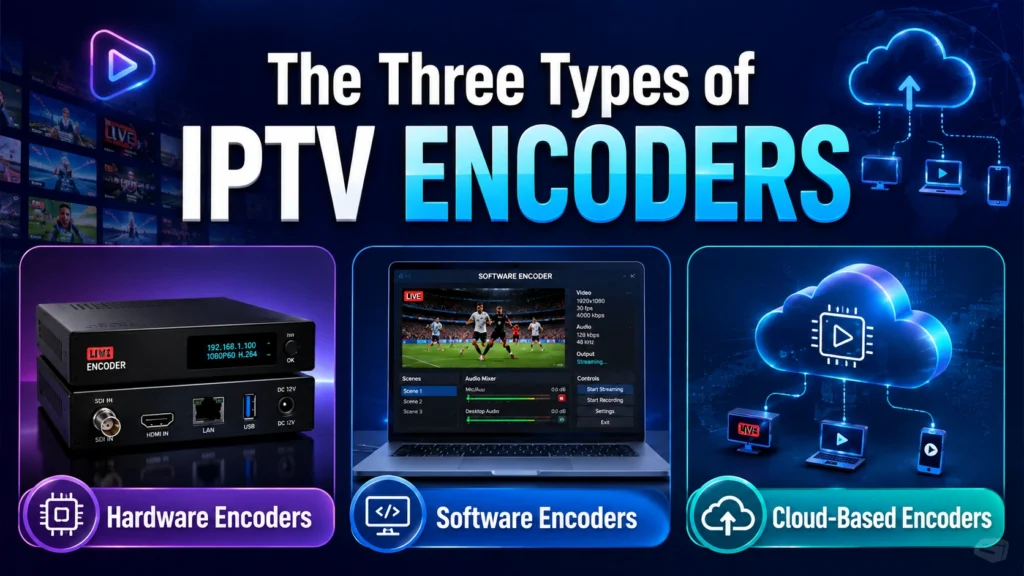
Hardware Encoders
These are dedicated physical devices built specifically for encoding — nothing else running on the box competing for resources. Brands like Haivision, Teradek, and VITEC dominate the professional end of this market. They offer the lowest latency and the most consistent, predictable performance, which is why stadiums, broadcast studios, and enterprise IPTV deployments lean on them almost exclusively. The tradeoff is price — professional hardware encoders typically run from a few hundred dollars for basic single-channel HDMI units up to several thousand for multi-channel, high-density units.
Software Encoders
These run on a regular computer or server, using its CPU or GPU to do the encoding work instead of dedicated silicon. OBS Studio (free and open source), Wirecast, and vMix are the names you’ll see most often. They’re flexible and far cheaper to get started with, but performance depends entirely on the machine they’re running on — a struggling CPU means dropped frames or a stream that can’t keep up.
Cloud-Based Encoders
Here, the encoding happens entirely on remote servers rather than on anything you own or maintain locally. Services like AWS MediaLive, Wowza Cloud, and Bitmovin fall into this category. They scale extremely well — you’re not limited by your own hardware — but the cost is usage-based, so a large or long-running broadcast can get expensive quickly if you’re not watching the meter.
Nobody’s category is objectively “best.” It comes down to what you’re actually broadcasting, at what scale, and what your budget looks like.
IPTV Encoder vs. Transcoder vs. Decoder — What’s the Difference?
This is a distinction most beginner guides skip, and it causes a lot of confusion when people start shopping for equipment.
Encoder: Converts raw, uncompressed video into a compressed digital stream. This is the first step, turning a camera feed or satellite signal into something transmittable.
Transcoder: Takes an already-compressed stream and converts it into a different format, resolution, or bitrate, for example, taking one incoming H.264 stream and generating five different quality versions of it for adaptive bitrate delivery. A transcoder works on streams that are already encoded; an encoder works on raw source video.
Decoder: Does the reverse of an encoder takes a compressed IP stream and converts it back into a viewable video signal, usually to output over HDMI to a screen. This is what sits on the receiving end of an IPTV distribution setup, often paired with a set-top box.
If you’re building a system that captures a live camera feed, generates multiple quality levels, and displays it on TVs around a building, you may well need all three pieces working together — not just one encoder.
H.264 vs. H.265: Which Codec Should You Use?
This is one of the most common questions people have once they understand what an encoder does, and the answer has shifted meaningfully over the past few years.
| Factor | H.264 (AVC) | H.265 (HEVC) |
|---|---|---|
| Compression efficiency | Standard | Roughly 2x better than H.264 |
| 4K support | Limited, inefficient | Built for it |
| Typical HD bitrate | 6–8 Mbps | 3–4 Mbps |
| Device compatibility | Universal | Most devices made after ~2020 |
| Encoding load | Lighter | Heavier — needs more processing power |
| Licensing cost | Lower | Higher |
H.265 is the better codec on paper for almost any 2026 deployment you get the same visual quality at roughly half the bandwidth, which matters a lot at scale. The catch is compatibility: if any meaningful portion of your audience is on older hardware, H.264 remains the safer default because virtually every device that has ever supported IPTV can decode it. Many professional setups actually encode in both, giving newer devices the efficient H.265 stream and falling back to H.264 for older ones.
Real Hardware Encoders and What They Cost
Specs on a page only tell you so much, so here’s a realistic sense of what’s actually on the market and what it costs, based on current listings from streaming equipment retailers.
| Encoder Type | Example Products | Typical Price Range |
|---|---|---|
| Single-channel HDMI encoder | SIIG HDMI H.264/H.265 encoder, J-Tech Digital HDMI encoders | $150 – $500 |
| Multi-port HDMI encoder (4–8 channels) | J-Tech Digital 8-port H.264/H.265 encoder | $800 – $2,500 |
| High-density multi-channel encoder | Thor Broadcast H-HDPerformux series (up to 24 channels) | $2,000 – $6,000+ |
| Professional broadcast-grade encoder | Haivision Makito, VITEC encoders | $1,500 – $5,000+ |
| Portable field encoder | Teradek Bolt / Vidiu-class encoders | $500 – $2,500 |
| Software encoder | OBS Studio | Free |
| Paid software encoder | Wirecast, vMix | $400 – $1,200 (one-time license) |
| Cloud encoding | AWS MediaLive, Wowza Cloud | Usage-based, typically $1–$3 per stream-hour |
Cheaper single-channel HDMI encoders are genuinely fine for small setups — a single classroom, a small church, a single-camera live event. Once you’re running multiple simultaneous channels or need guaranteed uptime for something like a stadium or a paid subscriber base, the cost of a professional multi-channel unit is usually justified by the reliability you get in return.
Best Encoder Settings for 2026
Whether you’re configuring a hardware unit or software like OBS, these settings hold up well for most IPTV deployments:
- Codec: H.265 for 4K and bandwidth-conscious deployments; H.264 when maximum device compatibility matters more.
- Resolution: Match to your source and audience — 3840×2160 for 4K, 1920×1080 for Full HD, 1280×720 for standard HD.
- Bitrate: 4K H.265 around 15–25 Mbps. Full HD H.265 around 4–8 Mbps. Full HD H.264 around 6–12 Mbps.
- Frame rate: 30fps for standard NTSC content (USA), 25fps for PAL regions, and 50–60fps for fast-moving live sports.
- Audio: AAC-LC at 128–256 kbps for stereo; AAC 5.1 if you’re delivering surround sound.
- Transport protocol: HLS for the widest device compatibility, RTMP where low latency matters more than reach, UDP/RTP for local network distribution.
- Keyframe interval: Roughly 2 seconds (twice your frame rate) — this affects how quickly viewers’ devices can switch quality levels and how fast they can join a stream already in progress.
A common mistake worth calling out directly: cranking the bitrate up doesn’t automatically mean better quality. It mostly just raises the bandwidth demand on your viewers. A well-configured 6–8 Mbps H.265 stream will often look just as good as a sloppily configured 20 Mbps one, and it’ll be far more reliable for anyone on a weaker connection.
Common IPTV Encoder Problems and How to Fix Them
Buffering or stream drops. Usually comes down to either not enough upload bandwidth on the sending end, or an encoder CPU that’s maxed out. Lowering the target bitrate, switching to hardware encoding, or upgrading your connection are the standard fixes.
Audio/video sync drift. More common on software encoders, especially when mixing multiple input sources. Setting a fixed audio delay offset and making sure every source runs at the same sample rate (48kHz is the broadcast standard) usually resolves it.
High CPU usage. H.265 encoding is genuinely demanding on a processor. If usage is consistently pinned above 80%, GPU-accelerated encoding (NVIDIA NVENC or AMD’s equivalent) is the first thing to try before assuming you need new hardware entirely.
Playback fails on certain devices. Almost always a codec compatibility issue. H.264 inside an HLS or MP4 container plays on virtually anything. H.265 needs hardware decoding support on the receiving device — worth confirming before you standardize on it for a mixed-device audience. Almost always a codec compatibility issue. H.264 inside an HLS or MP4 container plays on virtually anything. H.265 needs hardware decoding support on the receiving device — worth confirming before you standardize on it for a mixed-device audience.
Do You Actually Need an IPTV Encoder as a Viewer?
No — and this is worth being direct about, because a lot of people land on this topic without realizing it doesn’t apply to them.
If you’re subscribing to an IPTV service provider to watch live TV, sports, and movies on a Firestick, Smart TV, or phone, the encoding has already happened long before the stream reaches you. That’s entirely your provider’s infrastructure. All you need on your end is a compatible app, a stable connection, and your subscription details.
Encoders matter to the people on the other side of that relationship — broadcasters, event organizers, churches and schools running their own channel, hotels and venues distributing TV internally, and IPTV providers themselves.
| Scenario | Need an Encoder? | Need a Subscription? |
|---|---|---|
| Watching live TV and VOD at home | No | Yes |
| Broadcasting your own live stream | Yes | Not required |
| Running an IPTV reseller business | No (unless also broadcasting) | Yes, reseller plan |
| Setting up hotel/venue internal IPTV | Yes | Sometimes, depending on content source |
| Watching international channels from abroad | No | Yes |
| Livestreaming a church service or school event | Yes | Not required |
Choosing the Right Encoder for Your Use Case
Different setups genuinely call for different equipment. A rough guide:
Single-camera events, small churches, classrooms: A basic single-channel HDMI hardware encoder ($150–$500) or free software like OBS Studio is usually more than enough.
Small business or multi-room venue (bars, gyms, small hotels): A 4–8 port HDMI encoder in the $800–$2,500 range gives you enough channels without the cost of enterprise gear.
Hotels, campuses, stadiums: High-density multi-channel encoders (up to 24+ channels) make sense here, along with proper redundancy planning — a single point of failure at this scale affects a lot of viewers at once.
Professional broadcasters and IPTV providers: Dedicated broadcast-grade hardware from established names, often paired with cloud-based scaling for peak demand, is the standard.
Remote or field production (live sports, outdoor events): Portable field encoders are built specifically for this — compact, battery-friendly, and designed to work over cellular connections when a wired connection isn’t available.
Legal and Compliance Considerations
This part gets skipped in most encoder guides, but it matters. An encoder itself is just a tool — like a camera or a microphone, it’s not illegal to own or use. What determines legality is what you’re doing with it.
Using an encoder to capture and redistribute content you don’t have the rights to — a cable feed, a satellite broadcast, a live sporting event you didn’t license — is copyright infringement in most countries, regardless of whether money changes hands. In the United States, the Protecting Lawful Streaming Act, passed in December 2020, specifically makes willful commercial-scale unauthorized streaming a federal felony, not just a civil matter. Rights holders including major sports leagues and broadcasters, have also pursued civil litigation against both operators and, in some cases, resellers of unauthorized IPTV access.
Legitimate uses of an encoder don’t run into any of this — broadcasting your own content, streaming an event you own the rights to, internal distribution within a business you operate, or educational and religious broadcasts you have permission to air. The distinction isn’t the equipment; it’s the content and whether you actually have the rights to distribute it.
Frequently Asked Questions
-
What is an IPTV encoder in simple terms?
It’s a device or piece of software that converts a raw video signal into a compressed digital stream that can travel over the internet. Think of it as the translator between a camera and a network.
-
Can you stream IPTV without an encoder?
As a viewer, yes — always. Your provider’s infrastructure has already handled the encoding before the stream reaches you. As a broadcaster distributing your own content, no, an encoder is a required step.
-
Is H.265 always better than H.264?
It’s more efficient — better quality at a lower bitrate — but H.264 still wins on compatibility with older devices. Many setups use both, encoding in H.265 for modern devices and falling back to H.264 for anything that can’t decode it.
-
How much does an IPTV encoder cost?
Anywhere from free (software like OBS Studio) to several thousand dollars for high-density, multi-channel broadcast-grade hardware. Most small-scale setups land in the $150–$800 range.
-
Do I need an encoder to run my own IPTV channel?
Yes, if you’re distributing your own live video. If you’re reselling access to an existing IPTV service instead of broadcasting original content, an encoder isn’t the piece you need — that’s a licensing and reseller-agreement question instead.
-
Is it legal to use an IPTV encoder?
The encoder itself is just equipment and is completely legal to own and use. What matters is the content — capturing and redistributing channels or events you don’t have rights to is illegal in most countries, while broadcasting your own or properly licensed content is not.
Final Thoughts
An IPTV encoder is infrastructure, not entertainment; it’s the invisible step that makes the entire rest of the IPTV experience possible, but it only matters to the people on the broadcasting side of the equation. If you’re a viewer, none of this equipment or configuration is something you’ll ever need to think about; your subscription and your streaming app handle it silently in the background.
If you’re on the other side building a broadcast, running a venue, or distributing your own contentOB the choice between hardware, software, and cloud encoding comes down to scale, budget, and how much reliability you need. Start with the smallest setup that fits your actual use case, get the codec and bitrate settings right, and make sure whatever you’re distributing is something you actually have the rights to send out.